본문 바로가기
프로덕트 디자이너 6기

DAY+51 [ vs코드- 웹 ]

by Joo-Juice 2025. 11. 25.

안녕하세요, 주-주스 입니다! 🍹


(ㆆᴗㆆ)*✲゚*。⋆

!!!³✺!~ 캠프 51일차  ~!✺!!!

☆*:.。.꒰ঌ(*´꒳`*)໒꒱.。.:*☆

오늘은
VS 코드로 웹사이트 구현에 대하여 포스팅하겠습니다!


아임웹https://imweb.me/best_production_list


아임웹 제작사례

코딩없이 아임웹을 이용해 만든 놀라운 사이트를 직접 확인해 보세요.

imweb.me

제작사례중 웹사이트 보면서 웹사이트 이미지 추출 후
ai에게 html / css 물어보고 코드 알기
코드안에 이미지 입력 등 진행하기

<index.html>

더보기
<!DOCTYPE html>
<html lang="en">
<head>
<meta charset="UTF-8">
<!-- 수정 포트폴리오-->
<title>JOO-JUICE 포트폴리오</title>
<meta name="viewport" content="width=device-width, initial-scale=1.0">


<!-- Google Fonts (원하면 다른 폰트로 바꿔도 됨) -->
<link rel="preconnect" href="https://fonts.googleapis.com">
<link rel="preconnect" href="https://fonts.gstatic.com" crossorigin>


<link rel="stylesheet" href="style.css">
</head>
<body>


<!-- HEADER -->
<header class="site-header">
<div class="inner">
<!--수정로고-->
<div class="logo">JOO-JUICE</div>
<!--두개만 남기기-->>
<nav class="main-nav">
<a href="#" class="active">Main</a>
<a href="#projects">Projects</a>


</nav>
</div>
</header>


<!-- HERO / INTRO -->
<main>
<section class="intro">
<div class="inner">
<p>
<strong>Suhyeon Joo</strong> I'm from korea. represents the initials of 'ordinary art original
art', a space that introduces art creating a point of natural sympathy
for the ordinary daily life of the viewer, the artist’s personal
experience, and the artistic spirit inherent in the work.
</p>
</div>
</section>


<!-- CURRENT EXHIBITION 프로젝트 썸네일 넣어보기 -->
<section class="section">
<div class="inner">
<h2 class="section-title">My recent</h2>


<div class="current-grid">
<!-- 왼쪽 이미지 -->
<article class="current-item">
<div class="image-wrap">
<!-- src 를 네 이미지 파일로 바꿔줘 -->
<img src="images/7.png" alt="Project01">
</div>
<div class="caption">
<p>Kyu Hwa Moon, Jae Youl Jeoung, Sung Joo Ham: Life in Between</p>
<p>11/19–12/27/2025</p>
</div>
</article>


<!-- 오른쪽 이미지 -->
<article class="current-item">
<div class="image-wrap">
<img src="images/8.png" alt="Project02">
</div>
<div class="caption caption-right">
<a href="#">View more ↗</a>
</div>
</article>


<!--수정 이미지 추가-->
<article class="current-item">
<div class="image-wrap">
<img src="images/9.png" alt="Project02">
</div>
<div class="caption caption-right">
<a href="#">View more ↗</a>
</div>
</article>


</div>
</div>
</section>


<!-- PAST EXHIBITION 수정 / 섹션전체 삭제하기 h2/id=projects-->
<section class="section">
<div class="inner">
<h2 id="projects" class="section-title">My project</h2>


<div class="projects-grid">
<div class="project-item"><img src="images/4.png" alt=""></div>
<div class="project-item"><img src="images/5.png" alt=""></div>
<div class="project-item"><img src="images/6.png" alt=""></div>
<div class="project-item"><img src="images/7.png" alt=""></div>
<div class="project-item"><img src="images/8.png" alt=""></div>
<div class="project-item"><img src="images/9.png" alt=""></div>
</div>


</div>
</section>
<!--여기까지 삭제-->


<!-- ABOUT + SPACE IMAGE -->
<section class="section section-about">
<div class="inner about-layout">
<div class="about-text">
<button class="about-button">About</button>


<div class="about-info">
<p>나만의 내용으로 변경</p>
<p>32-11, Samseong-ro 63-gil, Gangnam-gu, Seoul, Republic of Korea</p>
<p>E oaoagallery@gmail.com<br>T 02.6207.3211<br>@oaoa_gallery</p>


<p class="about-hours">
수 - 토요일, 11 - 18시 (월, 화, 일요일, 공휴일 휴관)<br>
Wednesday - Saturday, 11am - 18pm<br>
(Closed on Mon, Tue, Sunday and Holidays)
</p>
</div>
</div>


<div class="about-image">
<img src="images/10.png" alt="oaoa gallery space">
</div>
</div>
</section>
</main>


<!-- FOOTER -->
<footer class="site-footer">
<div class="inner">
<p>Copyright 2022. oaoa gallery All rights reserved.</p>


<a href="#" class="to-top" aria-label="Back to top">
</a>
</div>
</footer>


</body>
</html>


[style.css]

더보기
/* 기본 설정 */
*,
*::before,
*::after{
box-sizing: border-box;
}


body{
margin: 0;
font-family: "Inter", system-ui, -apple-system, BlinkMacSystemFont, sans-serif;
color: #111;
background-color: #fff;
line-height: 1.5;
}


img{
max-width: 100%;
display: block;
}


/* 공통 레이아웃 */
.inner{
width: 100%;
max-width: 1160px;
margin: 0 auto;
padding: 0 20px;
}


.section{
padding: 60px 0;
}


.section-title{
font-size: 14px;
font-weight: 500;
margin-bottom: 24px;
text-transform: uppercase;
}


/* HEADER */
.site-header{
position: sticky;
top: 0;
z-index: 10;
background-color: #fff;
}


.site-header .inner{
display: flex;
align-items: center;
justify-content: space-between;
height: 72px;
}


.logo{
font-size: 28px;
font-weight: 700;
letter-spacing: 0.05em;
}


.main-nav{
display: flex;
gap: 28px;
font-size: 13px;
text-transform: uppercase;
}


.main-nav a{
text-decoration: none;
color: #000;
position: relative;
padding-bottom: 3px;
}


.main-nav a.active::after,
.main-nav a:hover::after{
content: "";
position: absolute;
left: 0;
bottom: 0;
width: 100%;
height: 1px;
background-color: #000;
}


/* INTRO */
.intro{
padding: 80px 0 40px;
}
/*수정03 인트로 내용*/
.intro p{
font-size: 32px;
font-weight: 400;
max-width: 1120px;
}


/* CURRENT EXHIBITION 수정01*/
.current-grid{
display: grid;
grid-template-columns: repeat(3, minmax(0, 1fr)); /* 3개 가로 정렬 */
gap: 20px;
}


/*수정02.current-item .image-wrap{
background-color: #f5f5f5;
overflow: hidden;
}*/


.current-item .image-wrap{
background-color: #f5f5f5;
overflow: hidden;
aspect-ratio: 4 / 3; /* 비율 고정 (예: 4:3) */
}


/* 현재 공통 img 설정을 덮어쓰기 */
.current-item .image-wrap img{
width: 100%;
height: 100%;
object-fit: cover; /* 이미지 꽉 채우기, 비율 유지하면서 잘라냄 */
display: block;
}


.caption{
font-size: 10px;
margin-top: 8px;
color: #555;
}


.caption-right{
text-align: right;
}


.caption-right a{
font-size: 11px;
text-decoration: none;
color: #000;
}


/* PAST EXHIBITION 메인 */
.past-main{
background-color: #000;
margin-top: 12px;
margin-bottom: 40px;
padding: 40px 0;
text-align: center;
}


.past-title{
color: #fff;
font-size: 12px;
font-weight: 400;
margin-bottom: 24px;
}


.past-main-image{
max-width: 620px;
margin: 0 auto;
}


/* PAST EXHIBITION 하단 그리드 */
.past-grid{
display: grid;
grid-template-columns: repeat(2, minmax(0, 1fr));
gap: 20px;
}


.past-item .image-wrap{
background-color: #f5f5f5;
}


/* ABOUT 섹션 */
.section-about{
padding-bottom: 80px;
}


.about-layout{
display: grid;
grid-template-columns: minmax(0, 1.1fr) minmax(0, 1.4fr);
gap: 40px;
align-items: flex-start;
}


.about-button{
border: 1px solid #000;
background: transparent;
padding: 6px 16px;
font-size: 12px;
cursor: pointer;
margin-bottom: 16px;
}


.about-info{
font-size: 11px;
line-height: 1.7;
}


.about-hours{
margin-top: 16px;
}


.about-image{
background-color: #f5f5f5;
}


/* FOOTER */
.site-footer{
border-top: 1px solid #eee;
padding: 16px 0;
font-size: 11px;
}


.site-footer .inner{
display: flex;
align-items: center;
justify-content: space-between;
}


.to-top{
width: 32px;
height: 32px;
border-radius: 4px;
border: 1px solid #000;
display: inline-flex;
align-items: center;
justify-content: center;
text-decoration: none;
color: #000;
font-size: 18px;
}
/*수정*/
/* PROJECTS GRID */
.projects-grid{
display: grid;
grid-template-columns: repeat(3, 1fr);
gap: 24px;
}


.project-item{
width: 100%;
aspect-ratio: 1 / 1; /* 정사각형 */
overflow: hidden;
background-color: #eee;
}


.project-item img{
width: 100%;
height: 100%;
object-fit: cover;
}
/*추가*/


/* 반응형 */
@media (max-width: 900px){
.intro p{
font-size: 17px;
}


.current-grid,
.past-grid,
.about-layout{
grid-template-columns: 1fr;
}


.caption-right{
text-align: left;
}


.site-header .inner{
flex-direction: column;
align-items: flex-start;
gap: 8px;
height: auto;
padding-top: 16px;
padding-bottom: 16px;
}
}


@media (max-width: 600px){
.inner{
padding: 0 16px;
}


.intro{
padding-top: 56px;
}


.logo{
font-size: 24px;
}
}


오늘의 실습 !

⭐️[최종 과제]

  • 오늘 작업한 웹사이트 다시한번 복습하거나 새로 웹 만들어도 가능!
  • 나만의 내용으로 바꿔서 작업 (이미지,프로필 등)
  • 링크로 제출 (github 호스팅)

⬇️⬇️⬇️⬇️⬇️⬇️⬇️⬇️⬇️⬇️⬇️⬇️⬇️⬇️⬇️⬇️⬇️

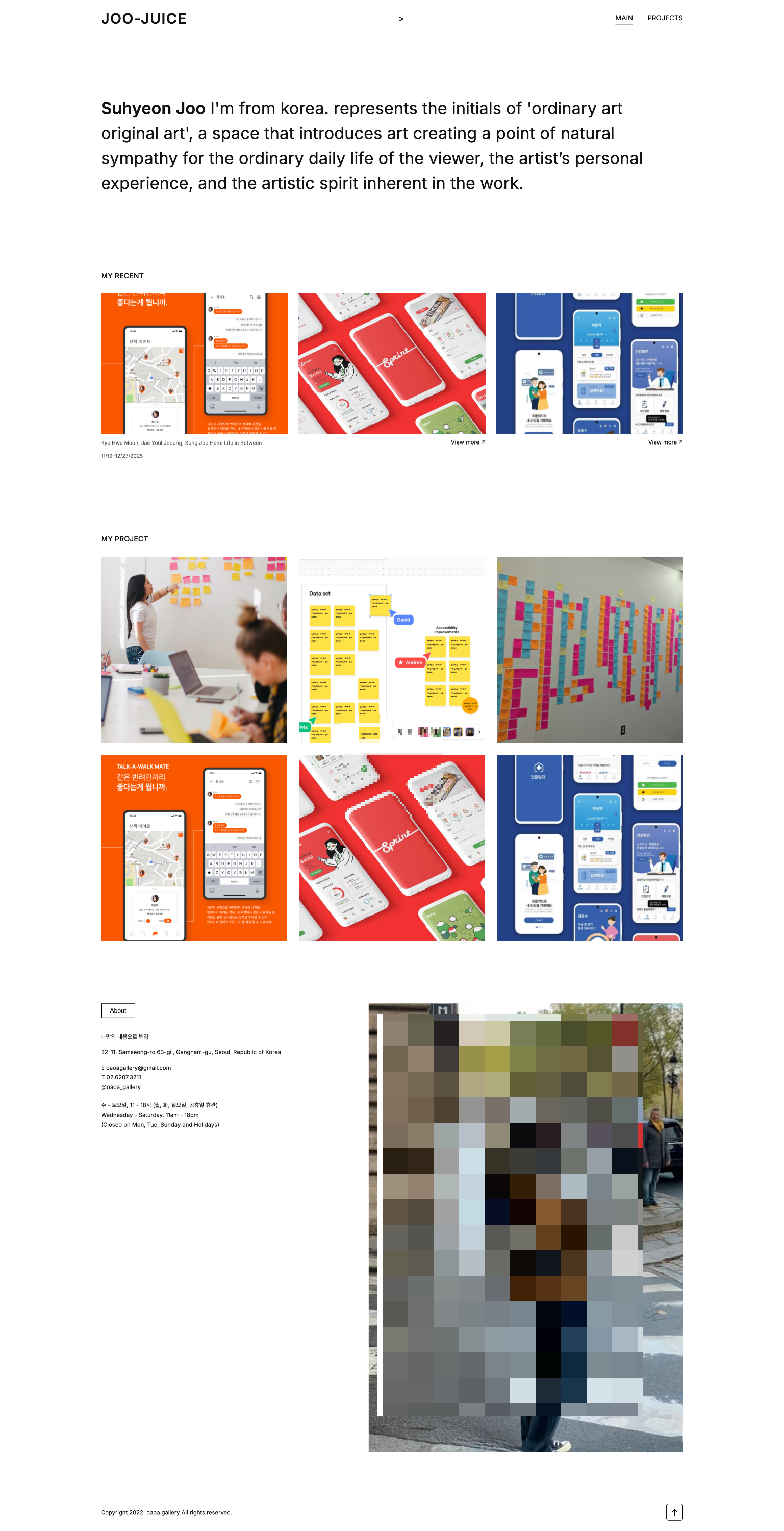
https://joojuice213.github.io/1125JSH/

⬆️⬆️⬆️⬆️⬆️⬆️⬆️⬆️⬆️⬆️⬆️⬆️⬆️⬆️⬆️⬆️⬆️

[목표]

어떻게 ai를 응용하여 원하는 웹사이트를 제작할 수 있을지 개인 포트폴리오 웹사이트보다는
구현 방식 및 디자인 값 넣는 등 코드를 진행하는 것에 집중.


[어려웠던 점 ]

  • Home/ Blog/ Portfolio 누르면 원 웹사이트에서는 다른 탭으로 넘어가지만
    이 페이지 안에서 부분부분 이동하는 것으로 수정했습니다.
  • 토끼 위치 배치가 어려웠습니다.. 자꾸 어디론가 가버려서 코드를 다 뜯어서 살펴봤습니다!
  • 로고는 그록 이미지로 제작하여 피그마로 수정해서 입혀봤습니다! 사이즈 유의하여 : 300x160 진행했습니다!

  •  클릭시 섹션에 갈 수 있도록 코드 조정한 부분!


[51일차 소감🐥]

- 수업 51일차 까지 전부 다 수강하게 되었습니다!! 진짜 시간이 순식간에 지나간 느낌입니다.. 첫날의 나보다 전체 수강한 본인은.. 지금 포폴 1개 만들고 스터디 프로젝트를 진행하고 있으며 코앞에 미니프로젝트를 진행하게 될 예정입니다!! 우왕아앟 진짜 프로덕트 디자이너가 될 수 있겠죠!? 진짜 아자아자 파이팅입니다!!!!

= 오늘의 한 마디 =
-  프로젝트의 신이 될테야 포폴의 신이 될테야 아자아자!!